Router — Home Network Traffic and Wi-Fi Device Guide
A router is a home networking device that directs internet traffic between your modem, Wi-Fi devices, and wired devices on the local network, serving as the central hub for all connected devices in the home.
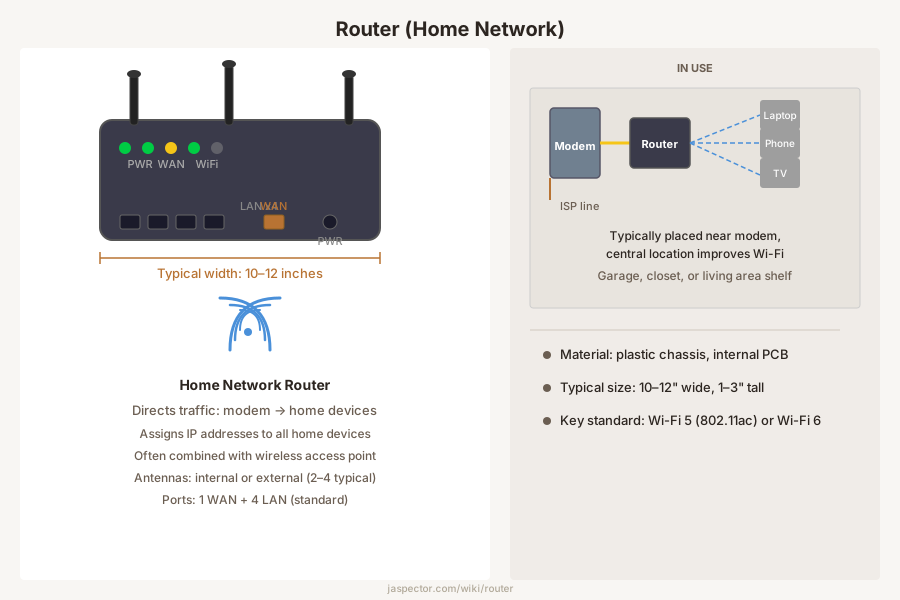
What It Is
In a typical home, the router creates and manages the local area network. It assigns a unique IP address to each connected device, directs data packets between devices, and routes traffic between the home network and the internet through the modem. The router also provides a basic firewall through Network Address Translation (NAT), which hides internal device addresses from the public internet.
Many consumer routers combine multiple functions in one box: a wired switch with four Ethernet ports, a wireless access point broadcasting on 2.4 GHz and 5 GHz bands, a firewall, and sometimes a USB port for shared storage. This all-in-one design simplifies setup but means that when one component fails or becomes outdated, the entire unit typically needs replacement.
Types
Standalone Wi-Fi routers are the most common type. They connect to a separate modem via Ethernet and broadcast Wi-Fi. Current Wi-Fi 6 (802.11ax) routers offer faster speeds, better handling of many simultaneous devices, and improved range compared to older Wi-Fi 5 (802.11ac) models.
Mesh router systems use two or more coordinated units placed throughout the home to eliminate dead zones. The base unit connects to the modem, and satellite units communicate with each other to create a single seamless network. Mesh systems work well in larger homes, multi-story layouts, and buildings with thick walls.
Combined modem-router gateways are all-in-one units supplied by internet providers. They handle both functions in one device but often have limited features and less frequent firmware updates than standalone models.
Where It Is Used
Routers are used in virtually every home with an internet connection, supporting phones, laptops, smart TVs, streaming devices, gaming consoles, security cameras, and smart-home equipment. The average household connects 15 to 25 devices simultaneously, which places real demands on router hardware.
The router is typically placed near the modem, often where the internet service enters the home. However, central placement significantly improves Wi-Fi coverage. When the modem location is not central, running an Ethernet cable to a centrally located router or using a mesh system can eliminate weak signal areas.
How to Identify One
A home router is a small electronic box, typically 6 to 12 inches across, with Ethernet ports on the back, a power input, and status LED lights. Many have external antennas, though newer models often use internal antennas. The ports are color-coded: one (often yellow, labeled WAN) connects to the modem, and the others (often blue, labeled LAN) connect to wired devices.
Most routers have a label on the bottom with the default Wi-Fi network name, password, model number, and settings IP address. Common signs of problems include slow speeds in parts of the home, frequent disconnections, devices failing to connect, or the unit running hot.
Replacement
Consider replacing a router when it no longer supports your internet plan speed, cannot handle the number of devices in your home, has stopped receiving security updates, or leaves dead zones. Routers older than five years often lack current Wi-Fi standards and may have unpatched security vulnerabilities.
Before replacing, rule out other causes. Restart both modem and router, check for ISP outages, test speed over a wired connection, and try moving the router to a more central spot. If the router is the confirmed bottleneck, choose a replacement rated for your speed tier and home size. For homes over 2,000 square feet or with multiple floors, a mesh system is often the most reliable option.
Frequently Asked Questions
Router — FAQ
- What is the difference between a modem and a router?
- The modem connects your home to the internet service coming from the provider. The router creates your home network and shares that connection among devices. Some ISP-supplied boxes combine both functions in one unit.
- Why is my Wi-Fi slow in one part of the house?
- Distance, walls, metal ductwork, appliance interference, and poor router placement are common causes. The router may also be old or undersized for the number of devices in use. Sometimes moving it a short distance helps more than changing settings.
- How often should a home router be replaced?
- There is no fixed schedule, but many homeowners replace them when coverage becomes poor, firmware support ends, or internet speeds have outgrown the hardware. Security support is an important reason to retire very old devices. A reliable router should still be rebooted and updated periodically.
- Can a router cause internet drops even if the provider is fine?
- Yes. Overheating, bad firmware, failing power supplies, and overloaded hardware can all interrupt the connection inside the home. Distinguishing between a provider issue and a local network issue is the first troubleshooting step.
- What is the difference between Wi-Fi 5 and Wi-Fi 6?
- Wi-Fi 6 (802.11ax) offers faster maximum speeds, better performance with many simultaneous devices, and improved range compared to Wi-Fi 5 (802.11ac). For homes with 15 or more connected devices, a Wi-Fi 6 router handles the traffic load more efficiently and reduces buffering and lag.
Have a question about your project? Get personalized answers from our team — $9/mo.
MembershipAlso in Electrical
- Range Outlet Appliance Circuits
- Appliance Whip Appliance Connections
- Dishwasher Cord Appliance Connections
- Dryer Cord Appliance Connections
- Range Cord Appliance Connections
- Generator Backup Power
- Transfer Switch Backup Power
- Box Cover Boxes