Modem — Home Internet Connection and Network Entry
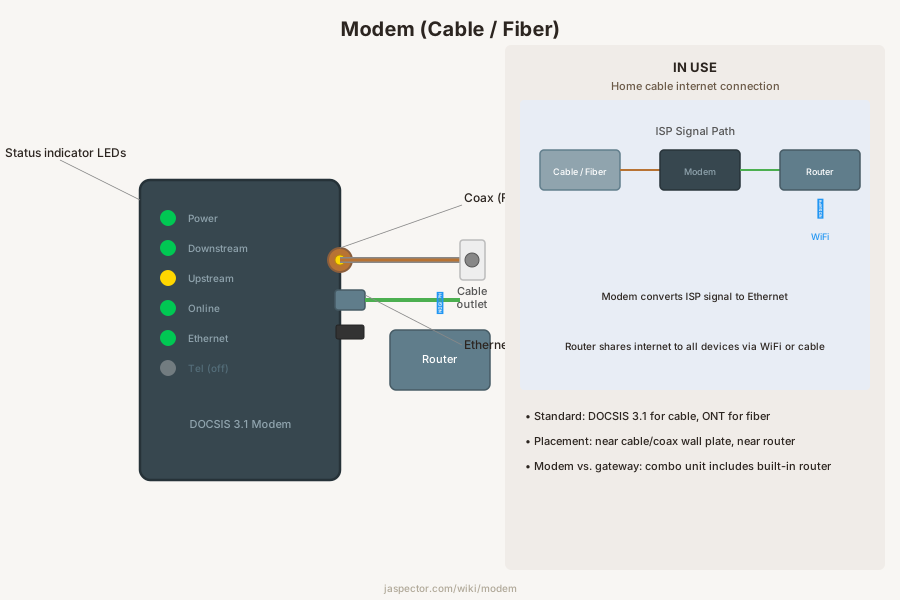
A modem is a network device that connects a home to an internet service provider and converts the incoming signal into a form the home network can use.
What It Is
The modem is the bridge between the provider's line and the home's local network equipment. Depending on the service type, it may connect to coaxial cable, fiber equipment, DSL wiring, or a fixed wireless gateway, and it may be a standalone device or combined with a router and Wi-Fi hardware in one box.
Although it is not a traditional building system component like a valve or vent, it still matters in the home because it needs power, a mounting location, service wiring, airflow, and sometimes structured media panel space. Poor placement can create overheating, weak Wi-Fi coverage, or awkward low-voltage cable runs.
Types
Common residential types include cable modems, DSL modems, fiber ONTs or gateways, and cellular or fixed-wireless internet gateways. Some units are modem-only devices that feed a separate router, while others combine modem, router, switch, and wireless access point functions.
The service technology determines the hardware. A cable modem cannot replace a fiber ONT, and provider approval may be required before a homeowner-owned unit can be activated on the account.
Where It Is Used
A modem is usually located near the point where the service enters the house, such as a utility room, office, living room media cabinet, or structured wiring panel. The best location balances provider wiring access, power availability, ventilation, and practical distribution of Ethernet or Wi-Fi throughout the home.
How to Identify One
Look for the device where the incoming service cable or fiber termination connects before the router or Wi-Fi network begins. It often has status lights for power, online connection, upstream, and downstream activity. A combined gateway may also have LAN ports and wireless labels, but the provider line still enters that same device first.
Replacement
Replacing a modem is usually straightforward if the new unit is compatible with the service and approved by the provider. The process may involve moving coax or Ethernet connections, activating the new device through the ISP, and reconfiguring any separate router. If the modem is wall-mounted in a low-voltage panel, cable slack, ventilation, and power supply fit should be checked before swapping hardware.
Frequently Asked Questions
Modem — FAQ
- What is the difference between a modem and a router?
- The modem connects your home to the internet provider. The router distributes that connection to your devices, either by Wi-Fi, Ethernet, or both. Some home gateways combine both jobs in one box, which is why the distinction is easy to miss.
- Can I move my modem to another room?
- Sometimes, but only if the service wiring and signal quality support that location. Moving a cable modem may require an active coax jack with the right signal levels, and moving fiber equipment may require technician involvement or a longer Ethernet run from the ONT.
- Why does my modem keep dropping offline?
- Possible causes include provider outages, bad coax splitters, loose connectors, overheating, failing power adapters, or a modem that is no longer stable on the provider network. Repeated disconnects justify checking the line first before simply replacing the device.
- Does a modem need ventilation?
- Yes. A modem or gateway should not be crammed tightly into an unvented cabinet or buried under papers because heat shortens electronics life and can cause unstable performance. A little open space around the unit makes a real difference.
Have a question about your project? Get personalized answers from our team — $9/mo.
MembershipAlso in Electrical
- Range Outlet Appliance Circuits
- Appliance Whip Appliance Connections
- Dishwasher Cord Appliance Connections
- Dryer Cord Appliance Connections
- Range Cord Appliance Connections
- Generator Backup Power
- Transfer Switch Backup Power
- Box Cover Boxes