Doorbell Button — Wired Switch Types and Replacement
A doorbell button is a momentary-contact switch mounted at an exterior door that completes a low-voltage circuit to activate a doorbell chime or buzzer inside the home.
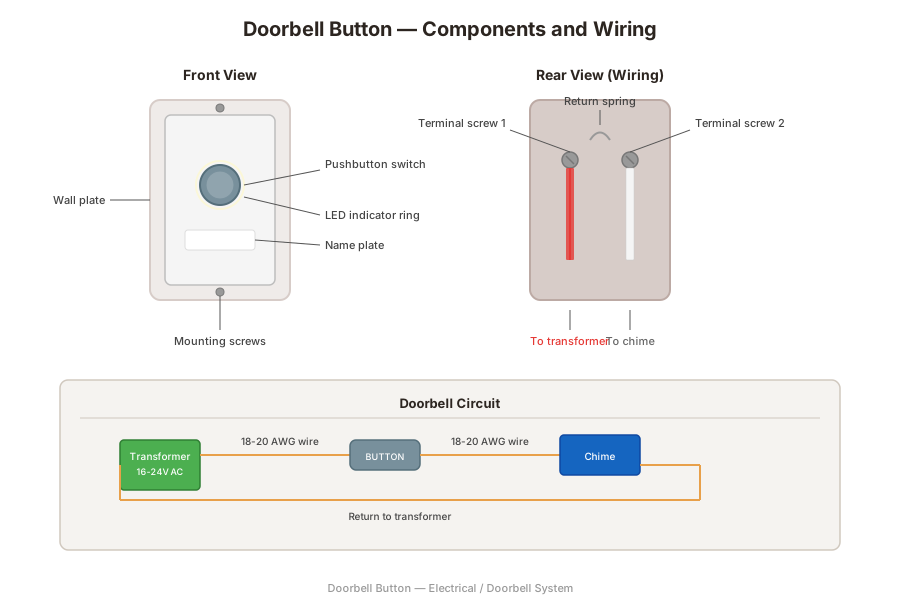
What It Is
A doorbell button is the user-facing component of a wired doorbell system. When a visitor presses the button, it closes a circuit that sends low-voltage current from the doorbell transformer through the chime mechanism, producing the audible alert. When released, a spring returns the button to the open position and the circuit breaks. The button operates at the transformer's secondary voltage, typically 16 to 24 volts AC, which is safe to touch even with the circuit energized.
The simplicity of the component belies its exposure to weather, physical abuse, and electrical fatigue. A corroded or stuck button is the most common cause of a dead doorbell system after transformer failure. The contact points inside the button are small pieces of copper or brass that touch when the plunger is depressed. Over thousands of cycles, these contacts develop a layer of oxidation that increases resistance until the current can no longer flow reliably.
Most doorbell buttons mount to the exterior door trim or siding using two screws spaced 1 to 2 inches apart. The wires pass through a small hole in the wall directly behind the mounting location and run inside the wall cavity to the chime and transformer. The button itself is typically less than 1 inch deep and sits flush against the wall surface.
Types
Standard mechanical buttons use a spring-loaded plunger that returns to the open position when released. Lighted buttons include a small incandescent lamp or LED that glows continuously to help visitors find the button at night; the lamp draws power from the transformer circuit and is wired in parallel with the button contacts. Decorative buttons come in brass, oil-rubbed bronze, nickel, and other finishes to match door hardware and architectural style.
Smart doorbell buttons integrate a camera, microphone, speaker, and Wi-Fi radio into the button housing. These units require significantly more power from the transformer than a standard button, typically needing a transformer rated at 16 to 24 volts and 20 to 40 VA. Wireless doorbell buttons use a battery and a radio transmitter to signal a plug-in receiver inside the home, bypassing the wired system entirely.
Where It Is Used
Doorbell buttons are mounted at the front door, back door, side door, or gate of residential and commercial buildings. Most homes have at least one button at the front entrance, and many have a second button at the back door wired to produce a different chime tone so occupants can distinguish which door a visitor is at. The standard mounting height for a doorbell button is 42 to 48 inches above the finished floor or threshold, placed on the lock side of the door frame within easy reach of a visitor.
In commercial buildings, doorbell buttons may be integrated into intercom panels or access control systems. ADA-compliant installations require the button to be mounted no higher than 48 inches and operable with a closed fist.
How to Identify One
A doorbell button is a small wall-mounted device next to an exterior door with a visible pushbutton and two low-voltage wires connected to screw terminals on the back. The button housing is typically rectangular or round, one to three inches across, and may be illuminated. The wires are thin gauge, usually 18 to 20 AWG, running through the wall to the transformer and chime.
To test a suspected faulty button, remove it from the wall and touch the two wires together briefly. If the chime sounds, the button is the failed component. If the chime does not sound, the problem lies elsewhere in the circuit — at the transformer, wiring, or chime unit.
Replacement
Replace a doorbell button when it sticks, fails to make contact, corrodes from weather exposure, or cracks from UV degradation. Turn off the transformer or the breaker feeding it as a precaution, remove the two mounting screws, and disconnect the wires from the terminal screws on the back of the button. Connect the wires to the new button's terminal screws — polarity does not matter on an AC doorbell circuit — and remount it using screws that grip the underlying trim or wall material.
The replacement should be rated for the system voltage and sized to cover the existing mounting holes or wall opening. If the new button has a different screw spacing, fill the old holes with exterior-grade filler and drill new pilot holes. Apply a bead of exterior caulk behind the button housing to prevent water from entering the wall cavity through the wire hole.
Frequently Asked Questions
Doorbell Button — FAQ
- Why does my doorbell not ring when I press the button?
- The most common causes are a failed button, a dead transformer, loose wire connections, or a faulty chime. Test the button by touching the two wires together — if the chime rings, the button is the problem. If it does not ring, check the transformer and chime next.
- Can I replace a doorbell button myself?
- Yes. Doorbell buttons operate on low voltage that is safe to handle. Turn off the transformer as a precaution, remove the old button, connect the two wires to the new button terminals, and mount it. No electrical permit is typically required for low-voltage doorbell work.
- Do doorbell buttons work with smart doorbells?
- Standard mechanical buttons are separate from smart doorbell cameras. A smart doorbell replaces the button entirely with a camera unit that has its own built-in button. The smart unit still uses the existing doorbell wiring but requires a transformer with a higher VA rating.
- Why does my doorbell button stick?
- Moisture, paint overspray, dirt, and corrosion can cause the button plunger to stick in the closed position. A stuck button keeps the chime circuit closed continuously, which can burn out the chime or cause a constant buzzing sound from the transformer.
- Can I add a second doorbell button for my back door?
- Yes. A second button can be wired in parallel with the existing button to the same chime, or wired to a separate chime terminal that produces a different tone. The transformer must have enough VA capacity to power all connected buttons and chimes.
Have a question about your project? Get personalized answers from our team — $9/mo.
MembershipAlso in Electrical
- Range Outlet Appliance Circuits
- Appliance Whip Appliance Connections
- Dishwasher Cord Appliance Connections
- Dryer Cord Appliance Connections
- Range Cord Appliance Connections
- Generator Backup Power
- Transfer Switch Backup Power
- Box Cover Boxes